| 1 | # Netdata AI |
| 2 | |
| 3 | Netdata AI is a set of analysis and troubleshooting capabilities built into Netdata Cloud. It turns high‑fidelity telemetry into explanations, timelines, and recommendations so teams resolve issues faster and document decisions with confidence. |
| 4 | |
| 5 | 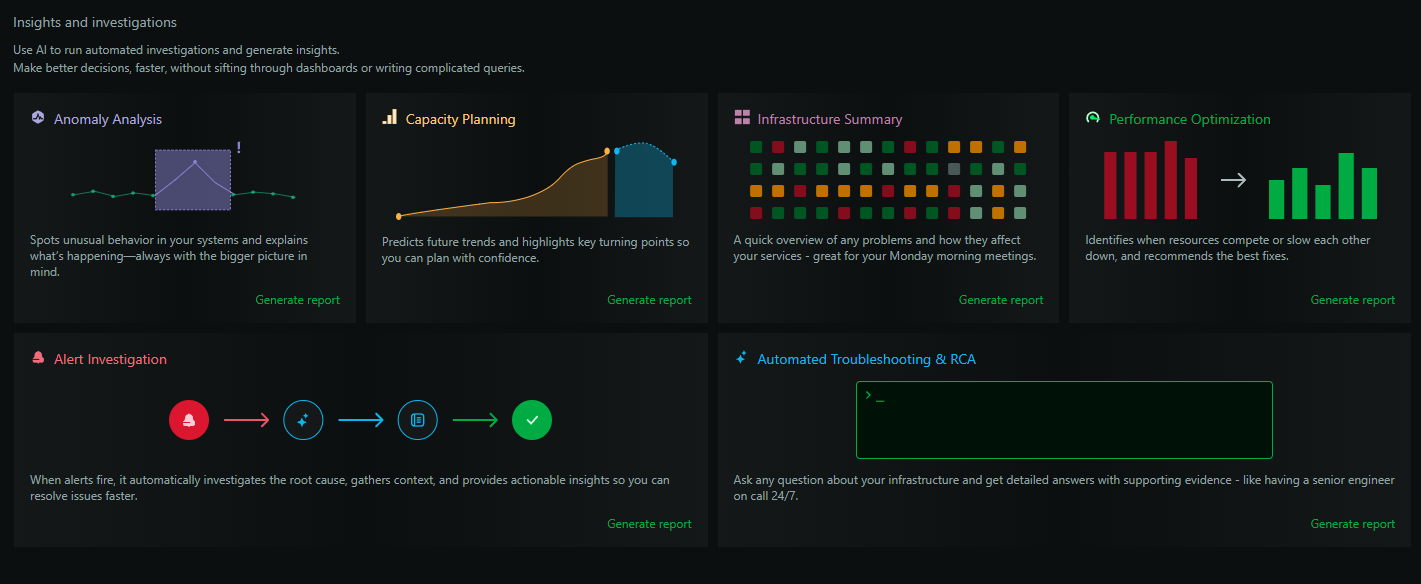 |
| 6 | |
| 7 | ## Why it’s accurate and powerful |
| 8 | |
| 9 | - Per‑second granularity: Every Netdata Agent collects metrics at 1‑second resolution, preserving short‑lived spikes and transient behavior. |
| 10 | - On‑device ML: Unsupervised models run on every agent, continuously scoring anomalies for every metric with zero configuration. |
| 11 | - Evidence‑based correlation: Netdata’s correlation engine relates metrics, anomalies, and events across nodes to form defendable root‑cause hypotheses. |
| 12 | - Full context: Reports and investigations combine statistical summaries, anomaly timelines, alert history, and dependency information. |
| 13 | |
| 14 | ## Capabilities |
| 15 | |
| 16 | ### 1) Conversations |
| 17 | |
| 18 | [Real-Time Conversations](/docs/netdata-ai/conversations.md) provide a live, interactive dialogue with Netdata AI. Ask rapid-fire questions, explore hypotheses, and get instant visualizations (Live Exhibits) embedded directly in the chat. Use Conversations for the exploratory phase of troubleshooting, then pivot to Investigations for comprehensive reports. |
| 19 | |
| 20 | ### 2) Insights |
| 21 | |
| 22 | Generates on‑demand, professional reports (see [AI Insights](/docs/ml-ai/ai-insights.md)): |
| 23 | |
| 24 | - [Infrastructure Summary](/docs/netdata-ai/insights/infrastructure-summary.md) – incident timelines, health, and prioritized actions |
| 25 | - [Performance Optimization](/docs/netdata-ai/insights/performance-optimization.md) – bottlenecks, contention, and concrete tuning steps |
| 26 | - [Capacity Planning](/docs/netdata-ai/insights/capacity-planning.md) – growth projections and exhaustion dates |
| 27 | - [Anomaly Analysis](/docs/netdata-ai/insights/anomaly-analysis.md) – forensics on unusual behavior and likely causes |
| 28 | |
| 29 | Each report includes an executive summary, evidence, and actionable recommendations. Reports are downloadable as PDFs and shareable with your team. You can also [schedule reports](/docs/netdata-ai/insights/scheduled-reports.md). |
| 30 | |
| 31 | ### 3) Investigations |
| 32 | |
| 33 | Ask open‑ended questions ("what changed here?", "why did X regress?") and get a researched answer using your telemetry — see the [Investigations overview](/docs/netdata-ai/investigations/index.md). Launch from Insights → New Investigation. Create [Custom Investigations](/docs/netdata-ai/investigations/custom-investigations.md) and set up [Scheduled Investigations](/docs/netdata-ai/investigations/scheduled-investigations.md). |
| 34 | |
| 35 | ### 4) Troubleshooting |
| 36 | |
| 37 | - [Alert Troubleshooting](/docs/troubleshooting/troubleshoot.md) – one‑click analysis for any alert with a root‑cause hypothesis and supporting signals |
| 38 | - [Anomaly Advisor](/docs/ml-ai/anomaly-advisor.md) – interactive exploration of how anomalies propagate across systems |
| 39 | - [Metric Correlations](/docs/metric-correlations.md) – focus on the most relevant charts for any time window |
| 40 | |
| 41 | See the [Troubleshooting overview](/docs/netdata-ai/troubleshooting/index.md). |
| 42 | |
| 43 | ### 5) Alerts Automation |
| 44 | |
| 45 | [Alerts Automation](/docs/netdata-ai/alerts-automation/alerts-automation.md) uses AI to suggest, generate, and test alert configurations. Describe what you want to monitor in plain English, and the AI generates the complete alert definition, tests it against historical data to show how it would have triggered, and lets you deploy it to your nodes — no need to learn alert configuration syntax or manually tune thresholds. |
| 46 | |
| 47 | ### 6) Anomaly Detection |
| 48 | |
| 49 | Local, unsupervised ML runs on every agent, learning normal behavior and scoring anomalies for all metrics in real time. Anomaly ribbons appear on charts, and historical scores are stored alongside metrics for analysis. See [ML Anomaly Detection](/docs/ml-ai/ml-anomaly-detection/ml-anomaly-detection.md), configure via [ML Configuration](/src/ml/ml-configuration.md), and review methodology in [ML Accuracy](/docs/ml-ai/ml-anomaly-detection/ml-accuracy.md). |
| 50 | |
| 51 | ### 7) MCP (Model Context Protocol) |
| 52 | |
| 53 | Connect AI clients to Netdata’s MCP server to bring live observability into natural‑language workflows and optional automation. Options include [MCP](/docs/netdata-ai/mcp/README.md), [Chat with Netdata](/docs/netdata-ai/mcp/ai-chat-netdata.md), and [MCP Clients](/docs/netdata-ai/mcp/mcp-clients/ai-devops-copilot.md) like Claude Desktop, Cursor, VS Code, JetBrains IDEs, Claude Code, Gemini CLI, and the Netdata Web Client. |
| 54 | |
| 55 | ## Usage and credits |
| 56 | |
| 57 | - Eligible Spaces receive 10 free AI credits; each Insights report, investigation, or alert troubleshooting run consumes 1 AI credit. |
| 58 | - Additional usage is available via AI Credits. Track usage from Settings → Usage & Billing → AI Credits. |
| 59 | |
| 60 | ## Note |
| 61 | |
| 62 | - No model training on your data: information is used only to generate your outputs. |
| 63 | - Despite our best efforts to eliminate inaccuracies, AI responses may sometimes be incorrect, please think carefully before making important changes or decisions. |