| 1 | # How to Delete Your Netdata Account |
| 2 | |
| 3 | :::note |
| 4 | |
| 5 | Account deletion is permanent and cannot be undone. All user preferences will be lost. |
| 6 | |
| 7 | ::: |
| 8 | |
| 9 | ## Step-by-Step Guide |
| 10 | |
| 11 | ### Step 1: Access Your Profile Settings |
| 12 | |
| 13 | Navigate to the Netdata UI and locate your **user profile icon** in the bottom-left corner of the interface. Click on it to open the profile menu. |
| 14 | |
| 15 | ### Step 2: Open Settings |
| 16 | |
| 17 | From the profile menu, click on **"Settings"** to access your account settings page. |
| 18 | |
| 19 | 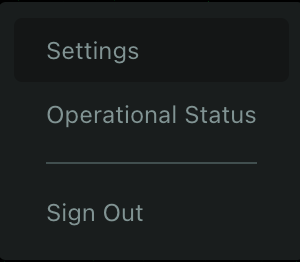 |
| 20 | |
| 21 | ### Step 3: Locate the Delete Account Option |
| 22 | |
| 23 | Once in the Settings page, your profile information will appear in a pop-up window on the right side of the screen. Scroll to the bottom of this pop-up where you'll find the **"Delete account"** option in red text. |
| 24 | |
| 25 | ### Step 4: Confirm Account Deletion |
| 26 | |
| 27 | Click on **"Delete account"**. A confirmation dialog will appear asking you to verify the account you're about to delete. |
| 28 | |
| 29 | 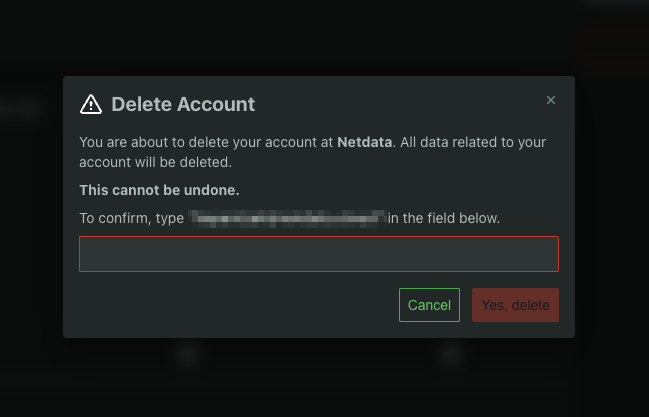 |
| 30 | |
| 31 | :::note |
| 32 | |
| 33 | To prevent accidental deletion of the wrong account, you'll need to type your account email address in the confirmation field. This ensures you're aware of exactly which account will be permanently deleted. |
| 34 | |
| 35 | ::: |
| 36 | |
| 37 | ### Step 5: Final Confirmation |
| 38 | |
| 39 | You have two options: |
| 40 | |
| 41 | | Action | Button | Result | |
| 42 | |--------|--------|--------| |
| 43 | | **Cancel** | Green button | Returns you to settings without deleting account | |
| 44 | | **Yes, delete** | Red button | Permanently deletes your account immediately | |
| 45 | |
| 46 | ## Important Considerations |
| 47 | |
| 48 | Before deleting your account, consider: |
| 49 | |
| 50 | - **Team access**: If you're part of a team Space, ensure you've transferred any necessary permissions |
| 51 | - **No recovery**: There is no grace period or recovery option once deletion is confirmed |
| 52 | |
| 53 | ## Alternative Options |
| 54 | |
| 55 | Before deleting your account, consider these alternatives: |
| 56 | |
| 57 | 1. **Pause Monitoring** - Temporarily disable monitoring without losing configurations |
| 58 | 2. **Sign Out** - Simply sign out if you need a break from the platform |
| 59 | 3. **Contact Support** - Reach out to [Netdata support](https://www.netdata.cloud/support/) if you're experiencing resolvable issues |
| 60 | 4. **Disable Notifications** - Turn off alerts if they're overwhelming |
| 61 | |
| 62 | ## FAQ |
| 63 | |
| 64 | <details> |
| 65 | <summary><strong>Can I recover my account after deletion?</strong></summary> |
| 66 | |
| 67 | No. Account deletion is permanent and cannot be reversed under any circumstances. |
| 68 | |
| 69 | </details> |
| 70 | |
| 71 | <details> |
| 72 | <summary><strong>What happens to my connected agents?</strong></summary> |
| 73 | |
| 74 | Agents will continue collecting data locally, but will lose their connection to deleted account. |
| 75 | </details> |
| 76 | |
| 77 | <details> |
| 78 | <summary><strong>How long does deletion take?</strong></summary> |
| 79 | |
| 80 | Account deletion is immediate. |
| 81 | |
| 82 | </details> |
| 83 | |
| 84 | <details> |
| 85 | <summary><strong>Will my historical data be saved anywhere?</strong></summary> |
| 86 | |
| 87 | Yes, all historical data will be safely stored and another active user in the Space can still access that data. |
| 88 | |
| 89 | </details> |
| 90 | |
| 91 | <details> |
| 92 | <summary><strong>Can someone else in my Space prevent my account deletion?</strong></summary> |
| 93 | |
| 94 | No. Account deletion is a personal action that only you can initiate and complete. Other Space members cannot prevent or reverse your account deletion. |
| 95 | |
| 96 | </details> |
| 97 | |
| 98 | :::note |
| 99 | |
| 100 | Once you confirm deletion, there is no undo button or recovery process. |
| 101 | |
| 102 | ::: |