| 1 | # systemd-cat-native |
| 2 | |
| 3 | `systemd` includes a utility called `systemd-cat`. This utility reads log lines from its standard input and sends them |
| 4 | to the local systemd journal. Its key limitation is that despite the fact that systemd journals support structured logs, |
| 5 | this command does not support sending structured logs to it. |
| 6 | |
| 7 | `systemd-cat-native` is a Netdata supplied utility to push structured logs to systemd journals. Key features: |
| 8 | |
| 9 | - reads [Journal Export Format](https://systemd.io/JOURNAL_EXPORT_FORMATS/) formatted log entries |
| 10 | - converts text fields into binary journal multiline log fields |
| 11 | - sends logs to any of these: |
| 12 | - local default `systemd-journald`, |
| 13 | - local namespace `systemd-journald`, |
| 14 | - remote `systemd-journal-remote` using HTTP or HTTPS, the same way `systemd-journal-upload` does. |
| 15 | - is the standard external logger of Netdata shell scripts |
| 16 | |
| 17 | ## Simple use: |
| 18 | |
| 19 | ```bash |
| 20 | printf "MESSAGE=hello world\nPRIORITY=6\n\n" | systemd-cat-native |
| 21 | ``` |
| 22 | |
| 23 | The result: |
| 24 | |
| 25 | 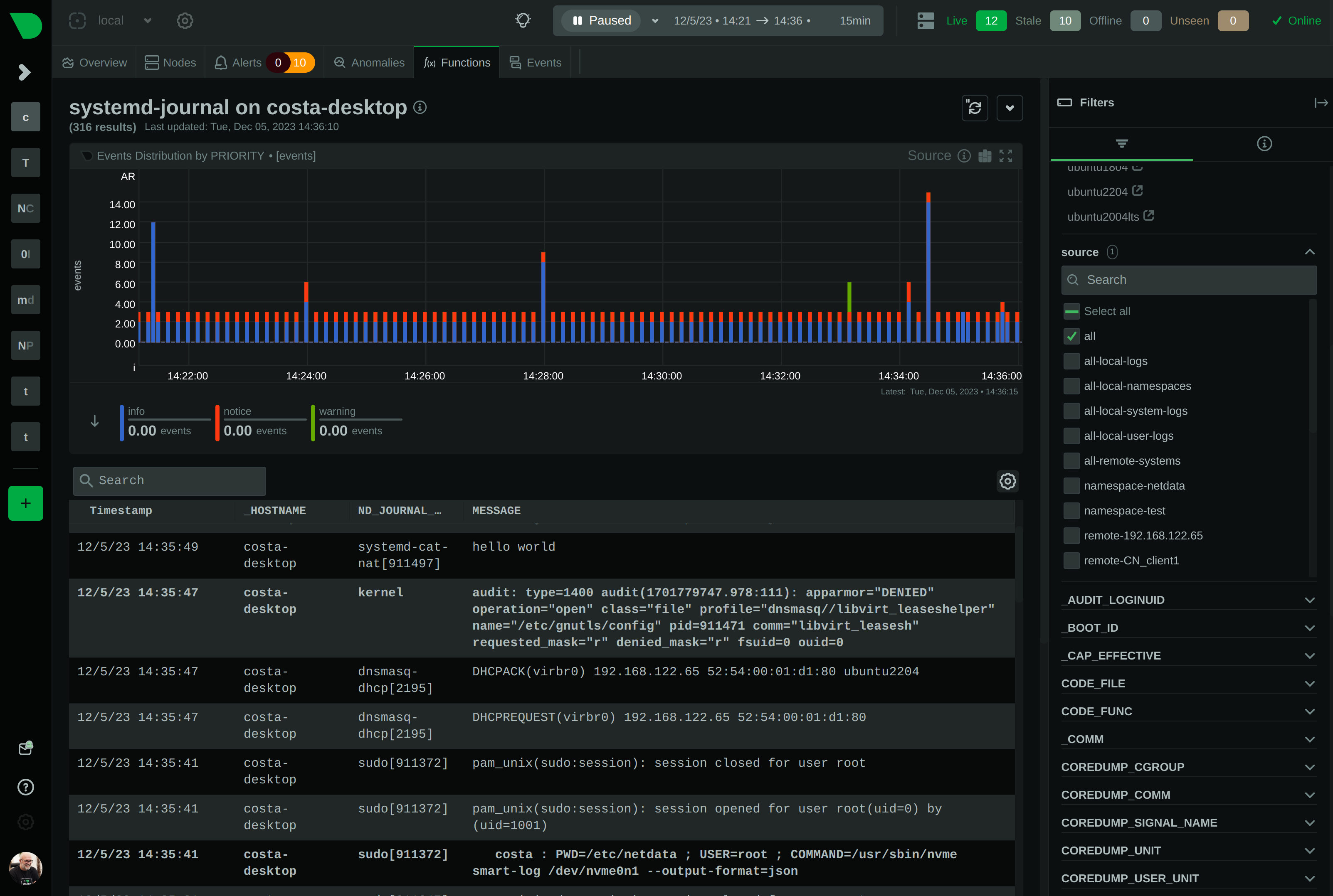 |
| 26 | |
| 27 | |
| 28 | Sending `PRIORITY=3` (error): |
| 29 | |
| 30 | ```bash |
| 31 | printf "MESSAGE=hey, this is error\nPRIORITY=3\n\n" | systemd-cat-native |
| 32 | ``` |
| 33 | |
| 34 | The result: |
| 35 | 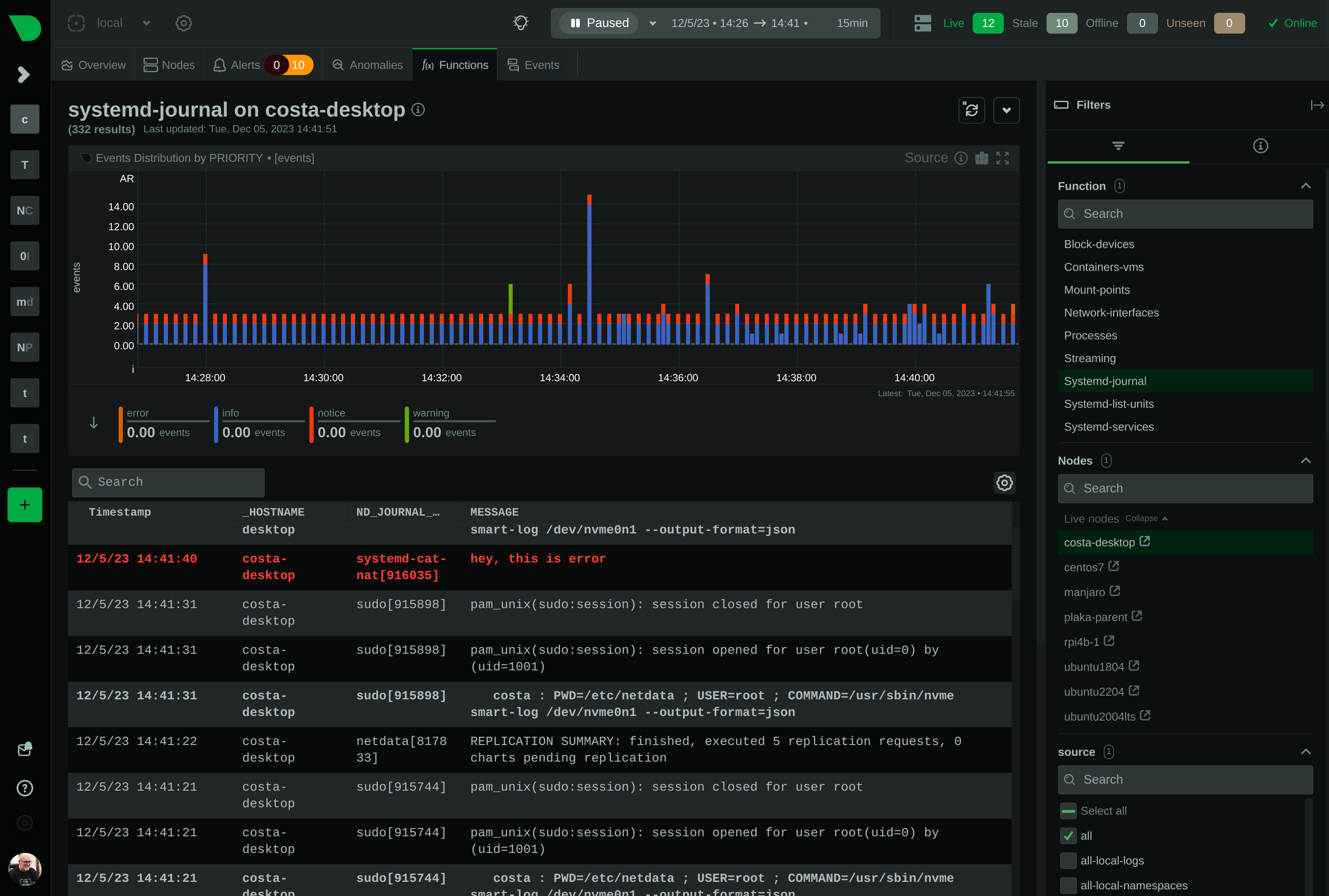 |
| 36 | |
| 37 | The program supports multi-line processing for all fields. The default newline sequence is `\n`. |
| 38 | |
| 39 | ```bash |
| 40 | printf "MESSAGE=hello\\\\nworld\nPRIORITY=6\n\n" | systemd-cat-native --newline='\n' |
| 41 | ``` |
| 42 | |
| 43 | `systemd-cat-native` needs to receive it like this for newline processing to work: |
| 44 | |
| 45 | ```bash |
| 46 | # printf "MESSAGE=hello\\\\nworld\nPRIORITY=6\n\n" |
| 47 | MESSAGE=hello\nworld |
| 48 | PRIORITY=6 |
| 49 | |
| 50 | ``` |
| 51 | |
| 52 | It also allows changing the newline sequence. In this example we replace the text `--NEWLINE--` with a newline in the log entry: |
| 53 | |
| 54 | ```bash |
| 55 | printf "MESSAGE=hello--NEWLINE--world\nPRIORITY=6\n\n" | systemd-cat-native --newline='--NEWLINE--' |
| 56 | ``` |
| 57 | |
| 58 | The result: |
| 59 | |
| 60 |  |
| 61 | |
| 62 | |
| 63 | ## Best practices |
| 64 | |
| 65 | These are the rules about fields, enforced by `systemd-journald`: |
| 66 | |
| 67 | - field names can be up to **64 characters**, |
| 68 | - field values can be up to **48k characters**, |
| 69 | - the only allowed field characters are **A-Z**, **0-9** and **underscore**, |
| 70 | - the **first** character of fields cannot be a **digit** |
| 71 | - **protected** journal fields start with underscore: |
| 72 | * they are accepted by `systemd-journal-remote`, |
| 73 | * they are **NOT** accepted by a local `systemd-journald`. |
| 74 | |
| 75 | For best results, always include these fields: |
| 76 | |
| 77 | - `MESSAGE=TEXT`<br/> |
| 78 | The `MESSAGE` is the body of the log entry. |
| 79 | This field is what we usually see in our logs. |
| 80 | |
| 81 | - `PRIORITY=NUMBER`<br/> |
| 82 | `PRIORITY` sets the severity of the log entry.<br/> |
| 83 | `0=emerg, 1=alert, 2=crit, 3=err, 4=warn, 5=notice, 6=info, 7=debug` |
| 84 | - Emergency events (0) are usually broadcast to all terminals. |
| 85 | - Emergency, alert, critical, and error (0-3) are usually colored red. |
| 86 | - Warning (4) entries are usually colored yellow. |
| 87 | - Notice (5) entries are usually bold or have a brighter white color. |
| 88 | - Info (6) entries are the default. |
| 89 | - Debug (7) entries are usually grayed or dimmed. |
| 90 | |
| 91 | - `SYSLOG_IDENTIFIER=NAME`<br/> |
| 92 | `SYSLOG_IDENTIFIER` sets the name of application. |
| 93 | Use something descriptive, like: `SYSLOG_IDENTIFIER=myapp` |
| 94 | |
| 95 | You can find the most common fields at `man systemd.journal-fields`. |
| 96 | |
| 97 | |
| 98 | ## Usage |
| 99 | |
| 100 | ``` |
| 101 | Netdata systemd-cat-native v1.43.0-333-g5af71b875 |
| 102 | |
| 103 | This program reads from its standard input, lines in the format: |
| 104 | |
| 105 | KEY1=VALUE1\n |
| 106 | KEY2=VALUE2\n |
| 107 | KEYN=VALUEN\n |
| 108 | \n |
| 109 | |
| 110 | and sends them to systemd-journal. |
| 111 | |
| 112 | - Binary journal fields are not accepted at its input |
| 113 | - Binary journal fields can be generated after newline processing |
| 114 | - Messages have to be separated by an empty line |
| 115 | - Keys starting with underscore are not accepted (by journald) |
| 116 | - Other rules imposed by systemd-journald are imposed (by journald) |
| 117 | |
| 118 | Usage: |
| 119 | |
| 120 | systemd-cat-native |
| 121 | [--newline=STRING] |
| 122 | [--log-as-netdata|-N] |
| 123 | [--namespace=NAMESPACE] [--socket=PATH] |
| 124 | [--url=URL [--key=FILENAME] [--cert=FILENAME] [--trust=FILENAME|all]] |
| 125 | |
| 126 | The program has the following modes of logging: |
| 127 | |
| 128 | * Log to a local systemd-journald or stderr |
| 129 | |
| 130 | This is the default mode. If systemd-journald is available, logs will be |
| 131 | sent to systemd, otherwise logs will be printed on stderr, using logfmt |
| 132 | formatting. Options --socket and --namespace are available to configure |
| 133 | the journal destination: |
| 134 | |
| 135 | --socket=PATH |
| 136 | The path of a systemd-journald UNIX socket. |
| 137 | The program will use the default systemd-journald socket when this |
| 138 | option is not used. |
| 139 | |
| 140 | --namespace=NAMESPACE |
| 141 | The name of a configured and running systemd-journald namespace. |
| 142 | The program will produce the socket path based on its internal |
| 143 | defaults, to send the messages to the systemd journal namespace. |
| 144 | |
| 145 | * Log as Netdata, enabled with --log-as-netdata or -N |
| 146 | |
| 147 | In this mode the program uses environment variables set by Netdata for |
| 148 | the log destination. Only log fields defined by Netdata are accepted. |
| 149 | If the environment variables expected by Netdata are not found, it |
| 150 | falls back to stderr logging in logfmt format. |
| 151 | |
| 152 | * Log to a systemd-journal-remote TCP socket, enabled with --url=URL |
| 153 | |
| 154 | In this mode, the program will directly sent logs to a remote systemd |
| 155 | journal (systemd-journal-remote expected at the destination) |
| 156 | This mode is available even when the local system does not support |
| 157 | systemd, or even it is not Linux, allowing a remote Linux systemd |
| 158 | journald to become the logs database of the local system. |
| 159 | |
| 160 | Unfortunately systemd-journal-remote does not accept compressed |
| 161 | data over the network, so the stream will be uncompressed. |
| 162 | |
| 163 | --url=URL |
| 164 | The destination systemd-journal-remote address and port, similarly |
| 165 | to what /etc/systemd/journal-upload.conf accepts. |
| 166 | Usually it is in the form: https://ip.address:19532 |
| 167 | Both http and https URLs are accepted. When using https, the |
| 168 | following additional options are accepted: |
| 169 | |
| 170 | --key=FILENAME |
| 171 | The filename of the private key of the server. |
| 172 | The default is: /etc/ssl/private/journal-upload.pem |
| 173 | |
| 174 | --cert=FILENAME |
| 175 | The filename of the public key of the server. |
| 176 | The default is: /etc/ssl/certs/journal-upload.pem |
| 177 | |
| 178 | --trust=FILENAME | all |
| 179 | The filename of the trusted CA public key. |
| 180 | The default is: /etc/ssl/ca/trusted.pem |
| 181 | The keyword 'all' can be used to trust all CAs. |
| 182 | |
| 183 | --namespace=NAMESPACE |
| 184 | Set the namespace of the messages sent. |
| 185 | |
| 186 | --keep-trying |
| 187 | Keep trying to send the message, if the remote journal is not there. |
| 188 | |
| 189 | NEWLINES PROCESSING |
| 190 | systemd-journal logs entries may have newlines in them. However the |
| 191 | Journal Export Format uses binary formatted data to achieve this, |
| 192 | making it hard for text processing. |
| 193 | |
| 194 | To overcome this limitation, this program allows single-line text |
| 195 | formatted values at its input, to be binary formatted multi-line Journal |
| 196 | Export Format at its output. |
| 197 | |
| 198 | To achieve that it allows replacing a given string to a newline. |
| 199 | The parameter --newline=STRING allows setting the string to be replaced |
| 200 | with newlines. |
| 201 | |
| 202 | For example by setting --newline='--NEWLINE--', the program will replace |
| 203 | all occurrences of --NEWLINE-- with the newline character, within each |
| 204 | VALUE of the KEY=VALUE lines. Once this this done, the program will |
| 205 | switch the field to the binary Journal Export Format before sending the |
| 206 | log event to systemd-journal. |
| 207 | |
| 208 | ``` |