| 1 | # Monitor Unbound DNS servers with Netdata |
| 2 | |
| 3 | [Unbound](https://nlnetlabs.nl/projects/unbound/about/) is a "validating, recursive, caching DNS resolver" from NLNet |
| 4 | Labs. In v1.19 of Netdata, we release a completely refactored collector for collecting real-time metrics from Unbound |
| 5 | servers and displaying them in Netdata dashboards. |
| 6 | |
| 7 | Unbound runs on FreeBSD, OpenBSD, NetBSD, macOS, Linux, and Windows, and supports DNS-over-TLS, which ensures that DNS |
| 8 | queries and answers are all encrypted with TLS. In theory, that should reduce the risk of eavesdropping or |
| 9 | man-in-the-middle attacks when communicating to DNS servers. |
| 10 | |
| 11 | This guide will show you how to collect dozens of essential metrics from your Unbound servers with minimal |
| 12 | configuration. |
| 13 | |
| 14 | ## Set up your Unbound installation |
| 15 | |
| 16 | As with all data sources, Netdata can auto-detect Unbound servers if you installed them using the standard installation |
| 17 | procedure. |
| 18 | |
| 19 | Regardless of whether you're connecting to a local or remote Unbound server, you need to be able to access the server's |
| 20 | `remote-control` interface via an IP address, FQDN, or Unix socket. |
| 21 | |
| 22 | To set up the `remote-control` interface, you can use `unbound-control`. First, run `unbound-control-setup` to generate |
| 23 | the TLS key files that will encrypt connections to the remote interface. Then add the following to the end of your |
| 24 | `unbound.conf` configuration file. See the [Unbound |
| 25 | documentation](https://nlnetlabs.nl/documentation/unbound/howto-setup/#setup-remote-control) for more details on using |
| 26 | `unbound-control`, such as how to handle situations when Unbound is run under a unique user. |
| 27 | |
| 28 | ```text |
| 29 | # enable remote-control |
| 30 | remote-control: |
| 31 | control-enable: yes |
| 32 | ``` |
| 33 | |
| 34 | Next, make your `unbound.conf`, `unbound_control.key`, and `unbound_control.pem` files readable by Netdata using [access |
| 35 | control lists](https://wiki.archlinux.org/index.php/Access_Control_Lists) (ACL). |
| 36 | |
| 37 | ```bash |
| 38 | sudo setfacl -m user:netdata:r unbound.conf |
| 39 | sudo setfacl -m user:netdata:r unbound_control.key |
| 40 | sudo setfacl -m user:netdata:r unbound_control.pem |
| 41 | ``` |
| 42 | |
| 43 | Finally, take note whether you're using Unbound in _cumulative_ or _non-cumulative_ mode. This will become relevant when |
| 44 | configuring the collector. |
| 45 | |
| 46 | ## Configure the Unbound collector |
| 47 | |
| 48 | You may not need to do any more configuration to have Netdata collect your Unbound metrics. |
| 49 | |
| 50 | If you followed the steps above to enable `remote-control` and make your Unbound files readable by Netdata, that should |
| 51 | be enough. Restart Netdata with `sudo systemctl restart netdata`, or the appropriate method for your system. You should see Unbound metrics in your Netdata dashboard! |
| 52 | |
| 53 | 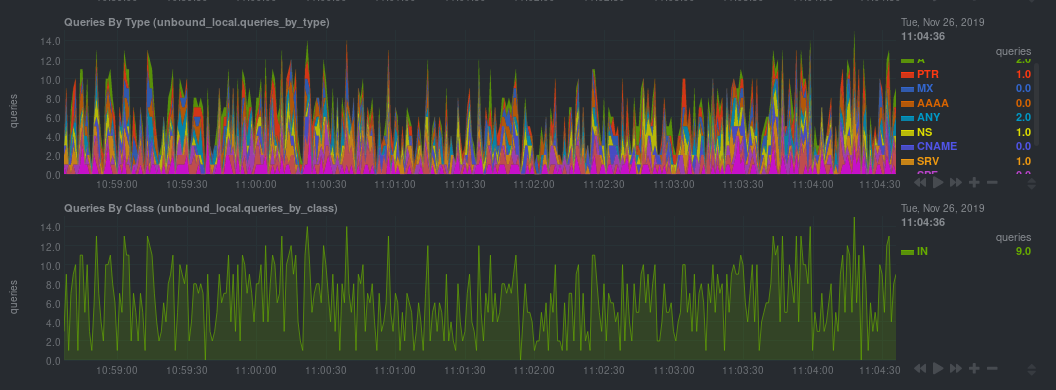 |
| 54 | |
| 55 | If that failed, you will need to manually configure `unbound.conf`. See the next section for details. |
| 56 | |
| 57 | ### Manual setup for a local Unbound server |
| 58 | |
| 59 | To configure Netdata's Unbound collector module, navigate to your Netdata configuration directory (typically at |
| 60 | `/etc/netdata/`) and use `edit-config` to initialize and edit your Unbound configuration file. |
| 61 | |
| 62 | ```bash |
| 63 | cd /etc/netdata/ # Replace with your Netdata configuration directory, if not /etc/netdata/ |
| 64 | sudo ./edit-config go.d/unbound.conf |
| 65 | ``` |
| 66 | |
| 67 | The file contains all the global and job-related parameters. The `name` setting is required, and two Unbound servers |
| 68 | can't have the same name. |
| 69 | |
| 70 | > It is important you know whether your Unbound server is running in cumulative or non-cumulative mode, as a conflict |
| 71 | > between modes will create incorrect charts. |
| 72 | |
| 73 | Here are two examples for local Unbound servers, which may work based on your unique setup: |
| 74 | |
| 75 | ```yaml |
| 76 | jobs: |
| 77 | - name: local |
| 78 | address: 127.0.0.1:8953 |
| 79 | cumulative: no |
| 80 | use_tls: yes |
| 81 | tls_skip_verify: yes |
| 82 | tls_cert: /path/to/unbound_control.pem |
| 83 | tls_key: /path/to/unbound_control.key |
| 84 | |
| 85 | - name: local |
| 86 | address: 127.0.0.1:8953 |
| 87 | cumulative: yes |
| 88 | use_tls: no |
| 89 | ``` |
| 90 | |
| 91 | Netdata will attempt to read `unbound.conf` to get the appropriate `address`, `cumulative`, `use_tls`, `tls_cert`, and |
| 92 | `tls_key` parameters. |
| 93 | |
| 94 | Restart Netdata with `sudo systemctl restart netdata`, or the appropriate method for your system. |
| 95 | |
| 96 | ### Manual setup for a remote Unbound server |
| 97 | |
| 98 | Collecting metrics from remote Unbound servers requires manual configuration. There are too many possibilities to cover |
| 99 | all remote connections here, but the [default `unbound.conf` |
| 100 | file](https://github.com/netdata/netdata/blob/master/src/go/plugin/go.d/config/go.d/unbound.conf) contains a few useful examples: |
| 101 | |
| 102 | ```yaml |
| 103 | jobs: |
| 104 | - name: remote |
| 105 | address: 203.0.113.10:8953 |
| 106 | use_tls: no |
| 107 | |
| 108 | - name: remote_cumulative |
| 109 | address: 203.0.113.11:8953 |
| 110 | use_tls: no |
| 111 | cumulative: yes |
| 112 | |
| 113 | - name: remote |
| 114 | address: 203.0.113.10:8953 |
| 115 | cumulative: yes |
| 116 | use_tls: yes |
| 117 | tls_cert: /etc/unbound/unbound_control.pem |
| 118 | tls_key: /etc/unbound/unbound_control.key |
| 119 | ``` |
| 120 | |
| 121 | To see all the available options, see the default [unbound.conf |
| 122 | file](https://github.com/netdata/netdata/blob/master/src/go/plugin/go.d/config/go.d/unbound.conf). |
| 123 | |
| 124 | ## What's next? |
| 125 | |
| 126 | Now that you're collecting metrics from your Unbound servers, let us know how it's working for you! There's always Room |
| 127 | for improvement or refinement based on real-world use cases. Feel free to [file an |
| 128 | issue](https://github.com/netdata/netdata/issues/new?assignees=&labels=bug%2Cneeds+triage&template=BUG_REPORT.yml) with your |
| 129 | thoughts. |